Link in bio and Linktree examples, ideas, and templates in 2026
Good link in bio examples put a photo, a short bio, a single main call-to-action button at the top, and
short link labels that fit a phone screen. Below are real mobile templates from Heya's library of 68
templates, followed by a comparison of five builders starting at $0.
Heya is ours, so read its row with that in mind. Every other number comes from each company's own pages,
checked on October 29, 2026.
The short answer
One clear first link The best examples highlight a single priority action right under
your name and photo, so visitors on a phone do not have to scroll or guess where to tap first.
Short button labels Keep button text to a few words so it stays on one line on a
small screen. Long sentences wrap awkwardly and make a list of links slower to scan.
Social icons grouped together Put social profiles in a compact icon row rather than
stacking each network as a full-width button. On Heya, the socials block links to 29 networks plus
email, phone, and website.
Start from a template Heya Free costs $0 with no credit card required, includes 68
templates, and lets you publish up to 3 sites at a yourname.heya.bio address right from your phone.
Link in bio examples you can open
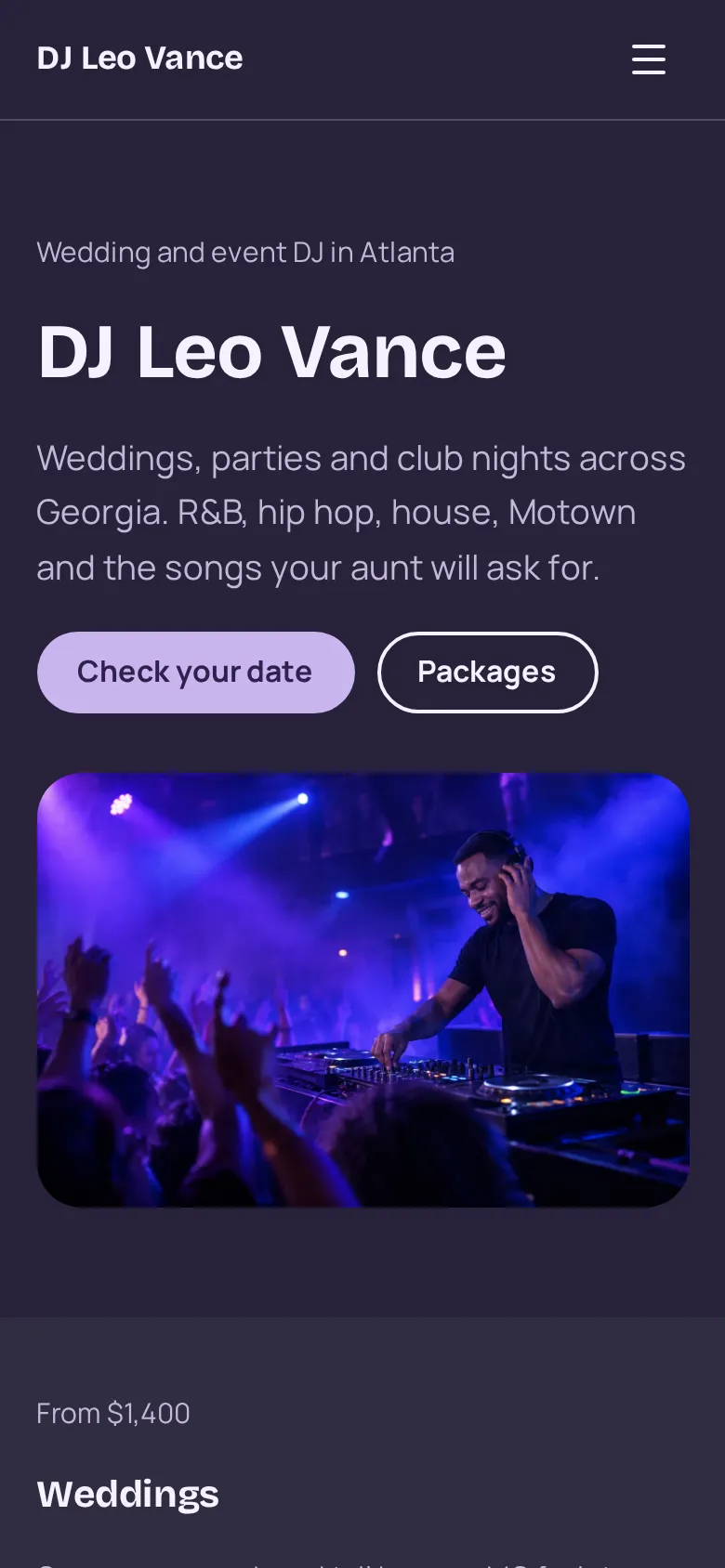
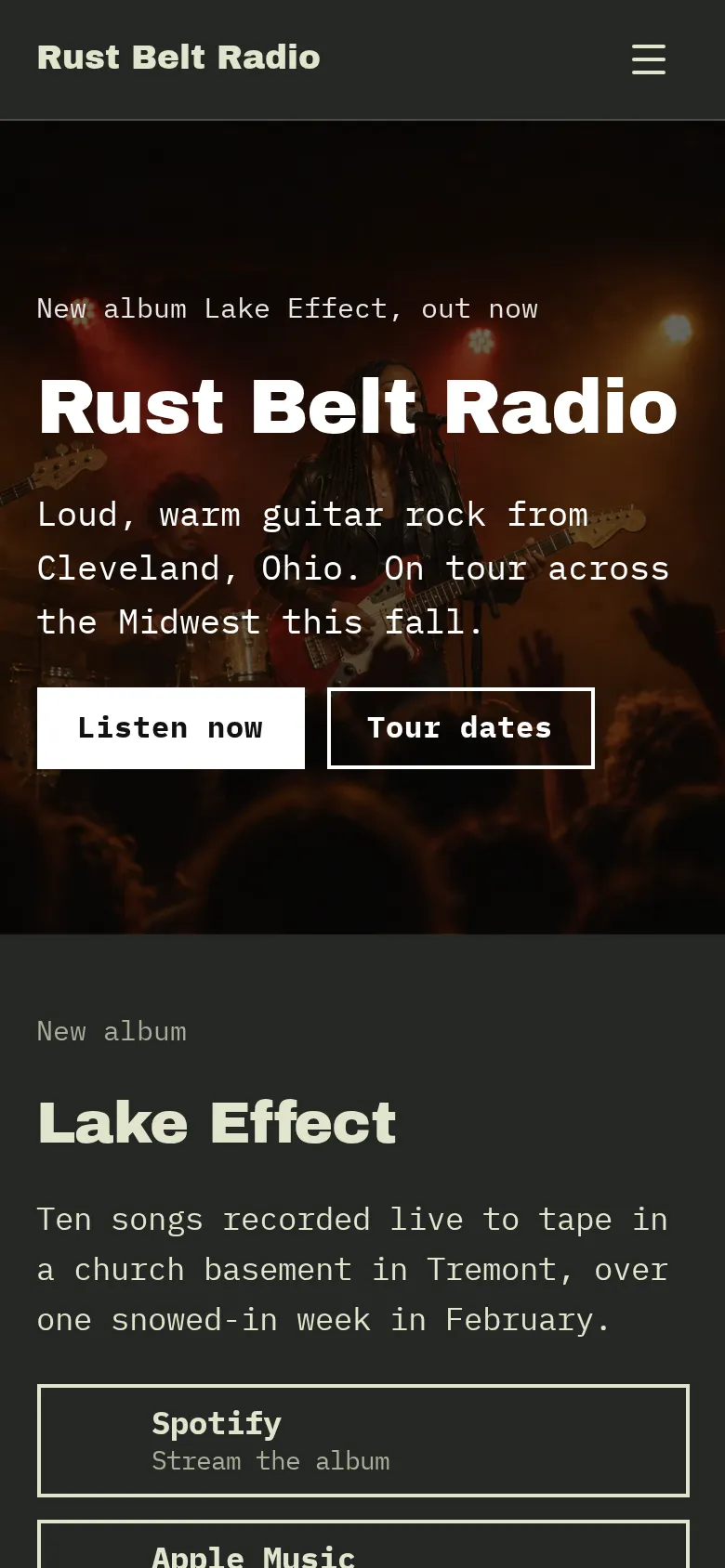
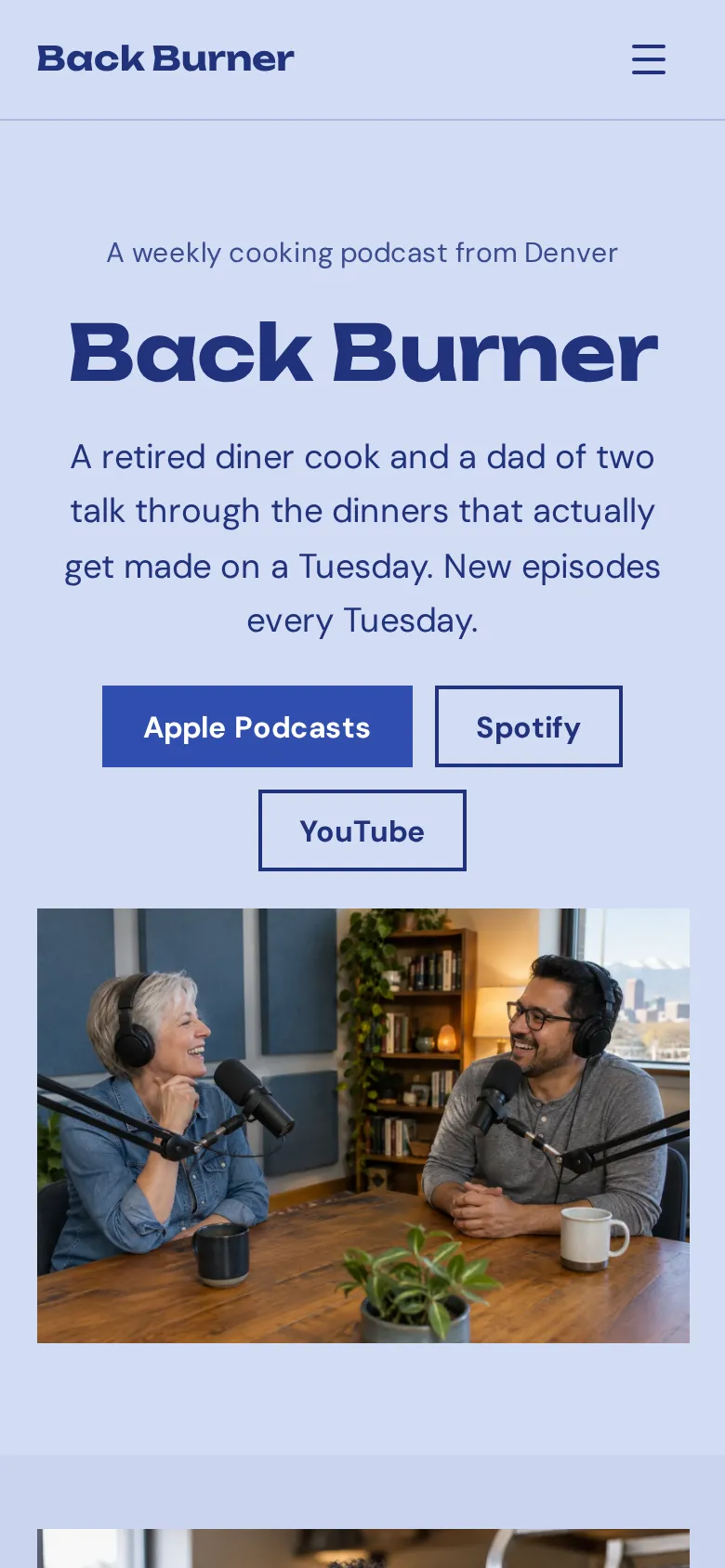
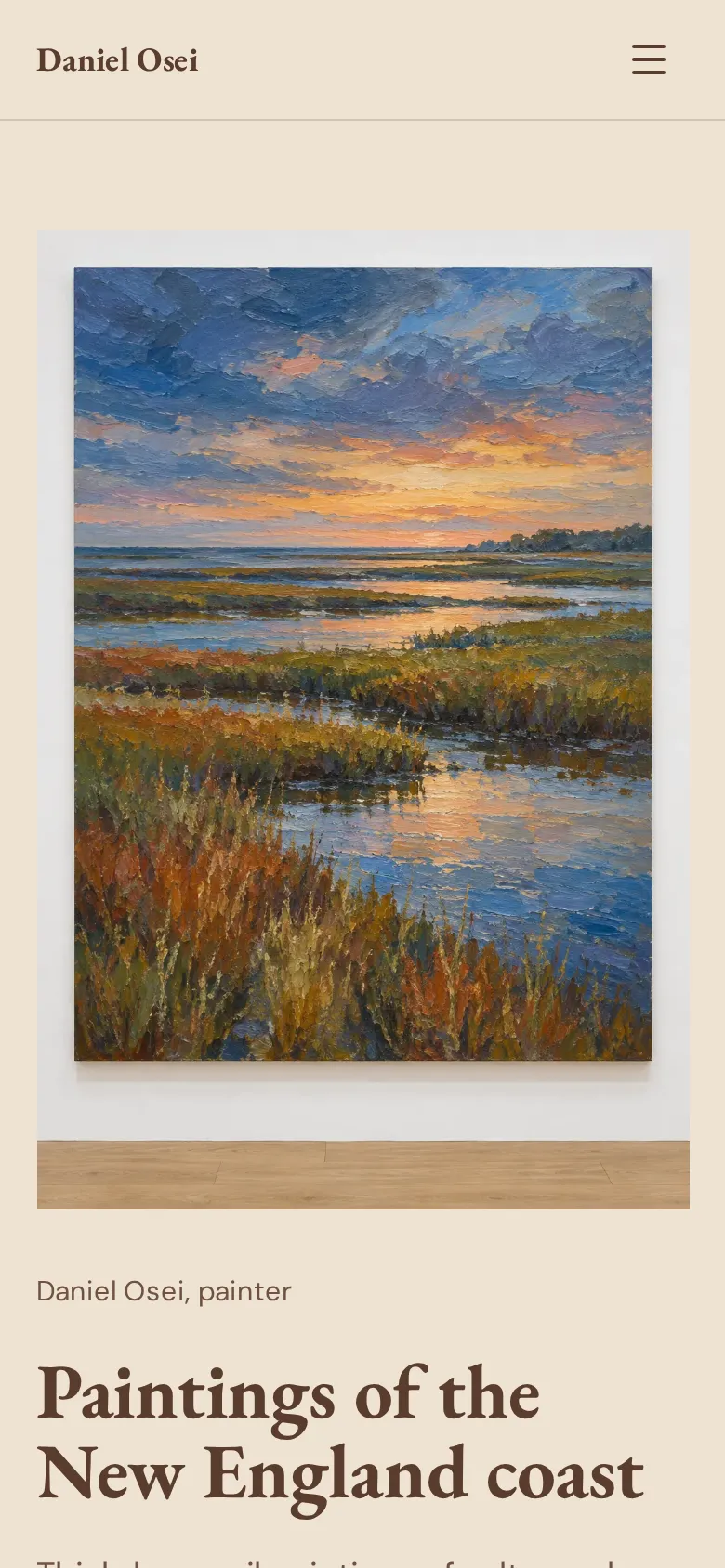
These are Heya templates shown on a phone. Each one is live: open the demo, or start your own from it.
Compare five website and link-in-bio builders on free plans, starting paid prices, custom domains, and
built-in selling.
Builder
Free plan
Paid plans from
Custom domain
Digital product sales
Heya
$0 for up to 3 sites at yourname.heya.bio
$3/mo (Pro Lite)
1 per account on Pro Standard ($6/mo)
Link a button to your checkout or store page
Linktree
Free with unlimited basic links
$7/mo billed annually (Starter)
Not stated
Yes; 0% fees on Pro ($14/mo billed annually)
Beacons
$0/mo free forever at beacons.ai/
$8.33/mo billed annually (Creator)
Free domain on Creator ($8.33/mo billed annually)
Yes; 9% fee on Free and Creator, 0% on Creator Plus
Milkshake
Free forever with unlimited links and Cards
US$2.99/mo billed monthly (Lite)
On Pro+ (US$8.33/mo billed yearly)
Yes, sell digital files with Stripe on Free
Carrd
Free Basic experience and 7-day Pro trial
$9/year (Pro Lite)
On Pro Standard ($19/year) and Pro Plus ($49/year)
Embed Stripe, PayPal, or Gumroad on Pro Standard
Swipe the table sideways to see every column.
Not stated means the provided product facts do not specify that detail; Linktree notes that transaction
and processing fees may still apply to sales.
How the link in bio builders compare
Heya
Free; paid from $3/mo
Our no-code builder gives you 68 templates and 10 block types. You can publish up to 3 sites for $0
at yourname.heya.bio, or pay $3 a month for Pro Lite. Pro Standard is $6 a month with 1 custom
domain per account.
Better at
Starting without an account, editing on a phone, and 68 templates on every plan.
Watch out
Free sites show a small badge; custom domains require Pro Standard ($6/mo); Google sign-in to
publish.
Linktree
Free; paid from $7/mo billed annually
Linktree's Free plan offers unlimited basic links plus email and phone sign-ups. Paid plans start at
$7 per month billed annually for Starter. Pro costs $14 per month billed annually, removes branding,
and lets you sell digital products. Premium is $30 per month billed annually.
Better at
Built-in email and SMS collection on Free, analytics, and selling digital products.
Watch out
Removing Linktree branding requires the Pro plan at $14 per month billed annually.
Beacons
Free; paid from $8.33/mo billed annually ($100/year)
Beacons has a $0 forever plan with unlimited digital product sales at a 9% commission. The Creator
plan is $8.33 per month billed annually at $100 with a free custom domain. Creator Plus drops the
sales commission to 0% for $25 per month billed annually at $300.
Better at
All-in-one creator store, email marketing, media kits, and a free custom domain on Creator.
Watch out
9% sales commission on the Free and Creator plans; paid plans start at $8.33/mo billed annually.
Milkshake
Free; paid from US$2.99/mo billed monthly
Milkshake lets you build swipeable Cards on your phone, with unlimited links and Stripe digital file
sales on Free. Lite removes branding for US$2.99 per month billed monthly, Pro is US$5.00 per month
billed yearly (US$59.99 per year), and Pro+ is US$8.33 per month billed yearly (US$99.99 per year)
with a custom domain.
Better at
Swipeable Card layout built on a phone and low-cost branding removal at US$2.99/month billed
monthly.
Watch out
Custom domains require the Pro+ tier at US$8.33 per month billed yearly (US$99.99/year).
Carrd
Free; paid from $9/year
Carrd builds one-page sites with a free Basic plan and a 7-day Pro trial. Pro Lite removes branding
on up to 3 sites for $9 per year. Pro Standard costs $19 per year for up to 10 sites and custom
domains, while Pro Plus is $49 per year for up to 25 sites.
Better at
Lowest yearly cost for custom domains, email signup forms, and custom code at $19/year.
Watch out
HTML download requires the $49/year Pro Plus plan; no native store without third-party widgets.
What to put on a link in bio page
Start your page with a clear photo or logo, your name, and one sentence on what you do. Right
underneath, put your single most important link as a prominent button so people know where to tap
first, followed by a short list of secondary links for recent releases, bookings, or latest work.
If you're a musician, DJ, or podcaster, an embedded media player lets people listen right on the page.
On Heya, our embed block handles YouTube, Vimeo, Spotify, SoundCloud, Calendly, and Google Maps, and
you can drop in a countdown block that ticks down the days, hours, minutes, and seconds to a show or
release. Wrap things up at the bottom with a compact row of social icons.
Wording and layout tips that work on phones
Almost everyone clicking from a social profile opens your page inside an in-app phone browser. Keep
your button labels under five words and start with an action verb like 'Listen on Spotify' or 'Book a
call' so the text doesn't wrap onto multiple lines. Instead of dumping merch, tour dates, and old
press links into one long list, break them up with headings or subtle dividers.
On Heya, you can put up to 40 sections on a page, with up to 6 buttons in a buttons block for featured
actions and up to 50 links in a links block for deeper archives. Stick to high-contrast colors from a
small palette so buttons stay readable in bright sunlight, and always check the layout on your phone
to make sure tap targets feel comfortable.
Common link in bio mistakes to avoid
The biggest mistake is giving every link the same visual weight, which makes people read a whole wall
of buttons just to pick one. Clear out expired event links and old announcements from the top of your
page too, since dead links make an artist or business look inactive, and use a compact social icon bar
instead of turning every social network into its own full-width button.
You'll also want to skip heavy images that load slowly on mobile data (Heya automatically resizes
uploads to 2048 pixels on the long edge and converts them to WebP). Finally, check if you need
built-in analytics, email capture forms, or digital checkout before picking a tool. On Heya, you can
link buttons to a Google Form or Tally form for sign-ups and to your checkout or store page for
payments, while Linktree, Beacons, Milkshake, and Carrd include built-in tools on specific plans.
How to start from an example template on Heya
You can pick any of our 68 templates or a blank page right in your browser without an account. Your
draft saves in your browser while you edit the 42 fonts, 14 theme presets, and 5-color palette on your
phone or computer. You can add and move 10 block types, including buttons, links, socials for up to 29
networks, or a Calendly embed.
When you're ready, sign in with Google to grab a free yourname.heya.bio address. Heya Free is $0 with
no credit card or time limit for up to 3 sites and 5 pages per site. Later on, Heya Pro Lite is $3 a
month to drop the 'Made with Heya' badge, and Heya Pro Standard is $6 a month with 1 custom domain per
account.
Plans change often. If a number here is out of date, email hello@heya.page and we'll fix it.
FAQ
How many links should a link in bio page have?+
One primary button at the top with a handful of secondary links keeps your page easy to scan on a
phone without scrolling. If you have more, group links under clear headings or put social profiles
in an icon row. On Heya, a buttons block holds up to 6 buttons, a links block holds up to 50
links, and the socials block connects up to 29 networks.
Can I build and edit my link in bio page on a phone?+
Yes, Heya, Milkshake, and Beacons all let you build or manage your page on a phone. With Heya, you
can build and edit your whole site in your mobile browser before you even make an account.
Milkshake is built around making swipeable Cards on your phone, and Beacons has an app on the App
Store and Google Play.
Which link in bio builder is best for selling digital products?+
Linktree, Beacons, and Milkshake all have built-in digital product sales, while on Heya you link a
button to your checkout or store page. You can sell files on the Free plans for Milkshake and
Beacons, which charges a 9% commission unless you get Creator Plus ($25/mo billed annually).
Linktree Pro has 0% platform fees at $14 per month billed annually, and Carrd lets you embed
Stripe, PayPal, or Gumroad widgets on Pro Standard at $19 per year.
What is the cheapest way to remove builder branding or use a custom domain?+
To remove builder branding, Carrd Pro Lite is $9 per year, Milkshake Lite is US$2.99 per month
billed monthly, and Heya Pro Lite is $3 a month. To use a custom domain, Carrd Pro Standard costs
$19 per year, Heya Pro Standard costs $6 a month for 1 domain, and Beacons Creator and Milkshake
Pro+ are both $8.33 per month billed yearly.
Can I embed Spotify, YouTube, or a booking calendar on a Heya page?+
Yes, Heya's embed block works with YouTube, Vimeo, Spotify, SoundCloud, Calendly, and Google Maps.
You can embed a Calendly scheduling page or link a button to the booking page you already use so
visitors can book appointments right from your link in bio.
Can I export the HTML code of my link in bio site?+
Both Heya and Carrd let you export your HTML code. Heya's Pro Plus plan at $15 a month lets you
download your site as a ZIP file with an index.html for each page, styles, fonts, and images.
Carrd includes unminified HTML, CSS, JS, and image downloads on its Pro Plus plan for $49 per
year.
Pick one of Heya's 68 templates and start building your link in bio page in your browser for $0,
with no credit card required and no account needed until you publish at yourname.heya.bio.