Wedding website examples in 2026: what to put on yours and where to build it
A good wedding website puts your names, date, venue, schedule, travel details, registry links, and RSVP
on a phone-friendly layout. You can build one for $0 on The Knot, Zola, Joy, Wix, or Heya, or pay from
$17 per month on Wix and $19 per month on Squarespace. Below are worked examples, wording tips, and six
builders compared.
Heya is ours, so read its row with that in mind. Every other number comes from each company's own pages,
checked on October 29, 2026.
The short answer
Clear ceremony details first The best examples put your names, the venue, the time, a
photo of the two of you, and buttons for the RSVP and schedule right on the home page.
Side-by-side schedule Listing the ceremony, dinner, and dancing side by side with
their start times stops guests from having to ask when to arrive.
Practical travel page Good examples group directions with a map link, the hotel
block, shuttle times, the dress code, and expected weather on one travel page.
Direct RSVP page State your reply-by date at the top, place a clear button to open
your RSVP form, and answer common questions about plus-ones, kids, food, and photos.
Wedding website examples you can open
These are the pages of the Heya wedding template. Open the live demo to click through it, or start your
own from it.
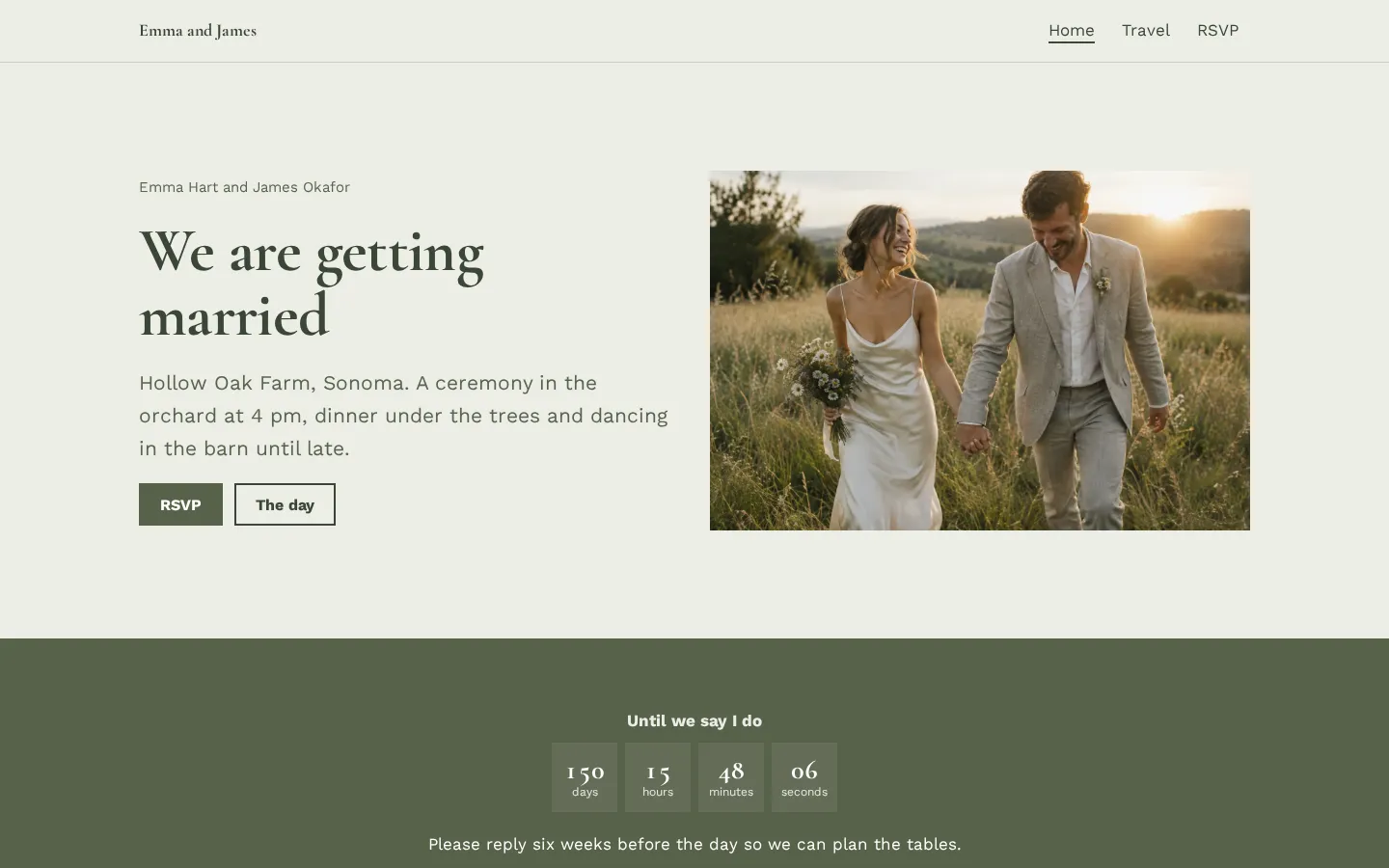
Home pageYour names, the venue and the time, a photo of the two of you, and buttons for the RSVP and the
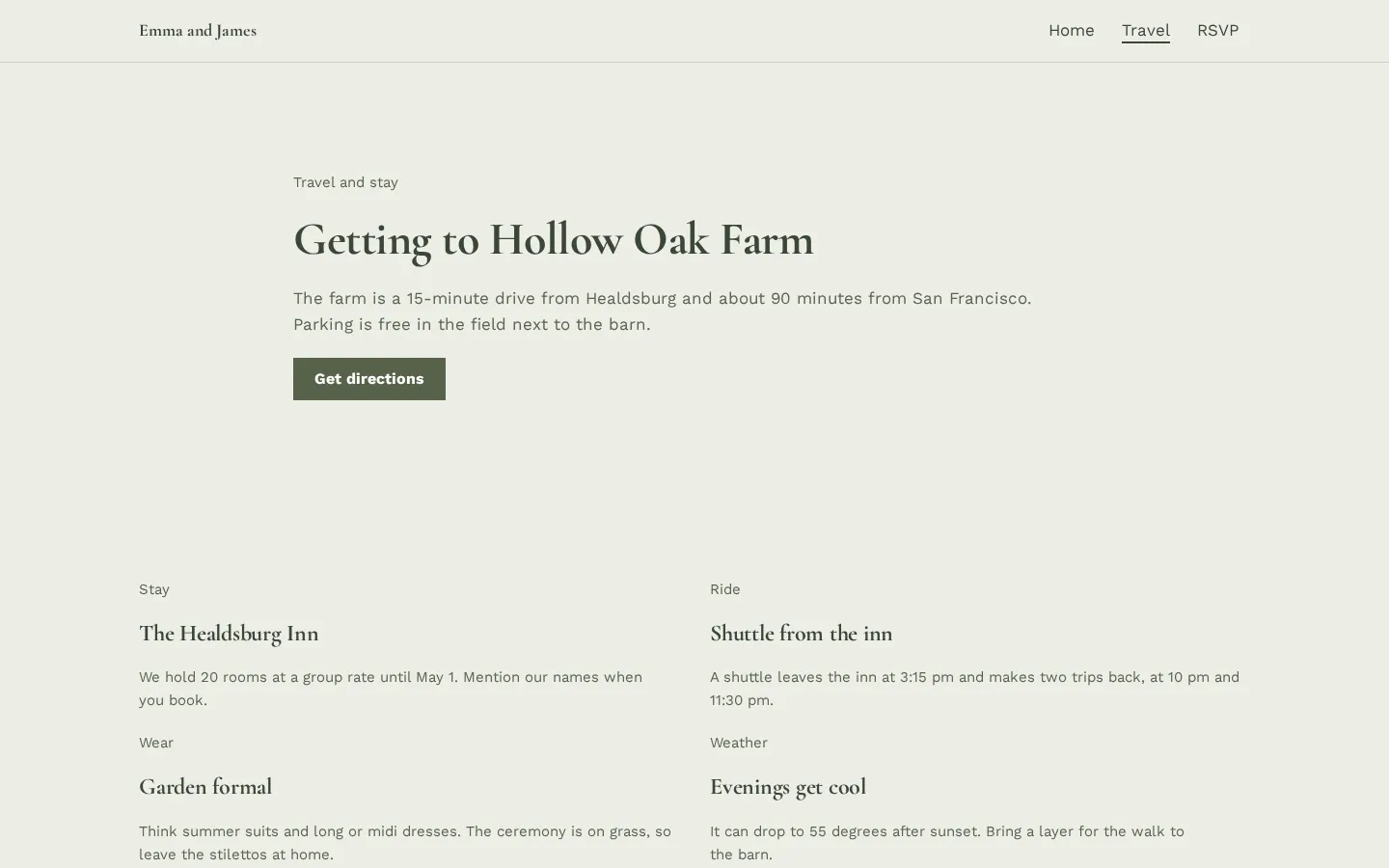
schedule.Open the live demoStart from itTravel pageDirections with a map link, your hotel block, the shuttle times, the dress code and what the
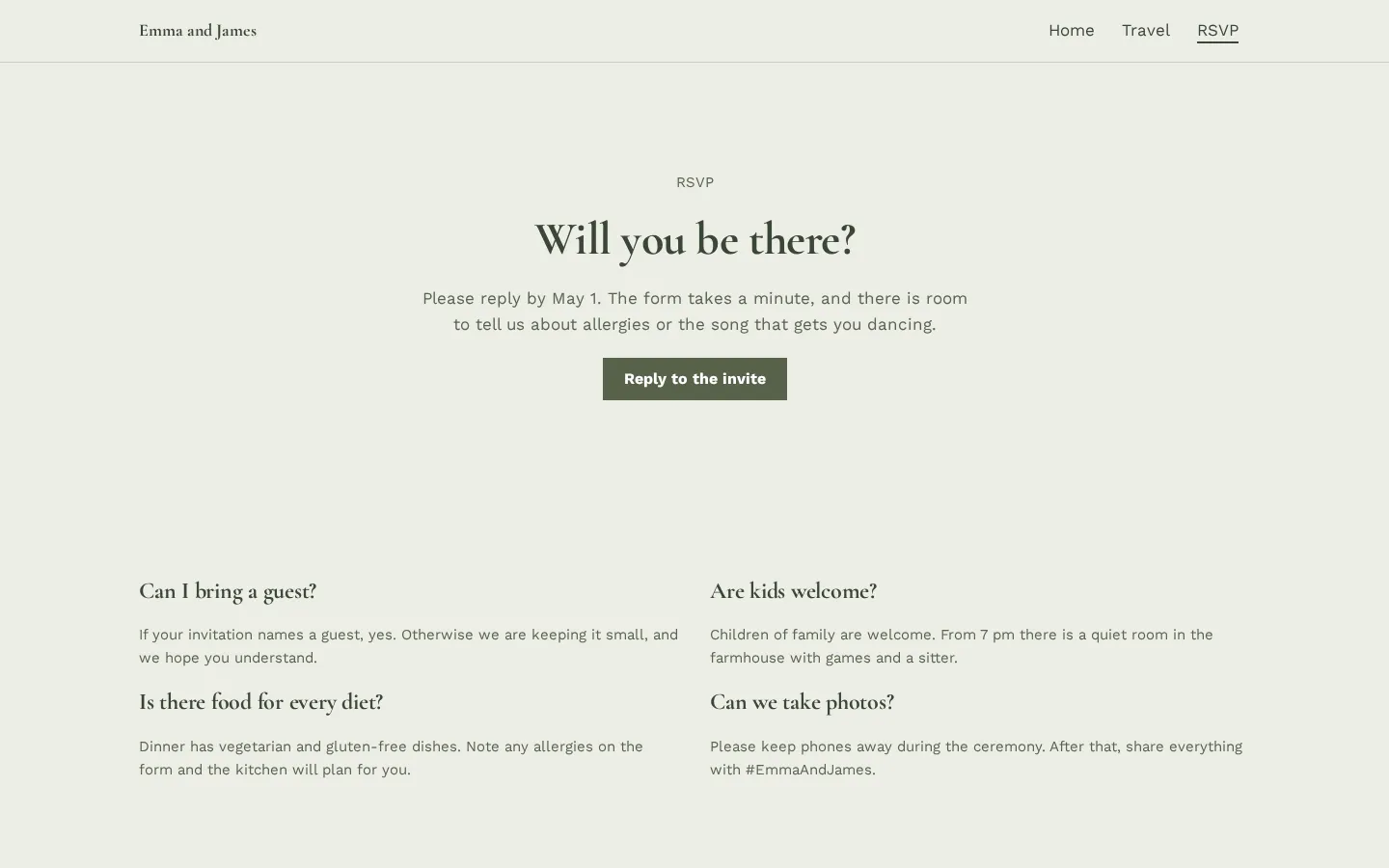
weather will do.Open the live demoStart from itRSVP pageYour reply-by date, a button that opens your RSVP form, and answers about guests, kids, food and
photos.Open the live demoStart from it
Where to make a wedding website: 6 builders compared
Compare free plans, custom domain costs, templates, and RSVP tools across dedicated wedding platforms
and general website builders.
Builder
Free plan
Paid plans or domains
Templates
Built-in RSVP & privacy
Heya
$0, up to 5 pages per site
Pro Standard $6/mo (1 domain/account)
68 total, including a wedding template
Link to a Google Form or Tally form; Hide from Google setting
The Knot
Free to create, publish, and share
Custom domain $19.99/yr (.wedding $99.99/yr)
100+ free wedding website designs
Built-in RSVP, guest list, and guest messaging
Zola
Free to create and publish
Custom domains starting at $17.99
Over 600 artist-designed wedding templates
Built-in RSVP, meal tracker, and password protection
Joy
$0/mo for unlimited guests
Optional paid domains ($20-$40/yr typical at providers)
Hundreds of free wedding design templates
Online RSVP, plus-one limits, and page passwords
Squarespace
14-day free trial, no credit card
From $19/mo (includes free custom domain*)
Designer templates and Blueprint AI generator
Not stated
Wix
$0 Free plan, no credit card
From $17/mo (yearly billing, 1-yr domain voucher on most Premium plans)
Over 2000 templates (1000s on Free plan)
Wix events tools track RSVPs
Swipe the table sideways to see every column.
Not stated means the provided facts do not specify built-in RSVP or password features for that platform.
How the 6 wedding website builders compare
Heya
Free; Pro Lite $3/mo, Pro Standard $6/mo
Ours is a no-code builder with a ready-made wedding template. You can edit on your phone without an
account and publish 3 sites (5 pages each) for $0 at yourname.heya.bio. Pro Standard is $6 a month
for 20 pages, no badge, and 1 custom domain.
Better at
Full phone editing, no account needed to draft, and 68 templates.
Watch out
Free sites show a small badge and allow 5 pages; publishing requires Google sign-in, and a
custom domain needs Pro Standard ($6/mo).
The Knot
Free; custom domain $19.99/year
The Knot gives you 100+ free wedding website templates with sections for events, travel, wedding
party, dress code, and gift registries, plus a free guest list manager, mobile app, and RSVPs.
Custom domains cost $19.99 for one year, $39.98 for two years, or $99.99 per year for a .wedding
extension.
Better at
100+ free wedding designs with built-in guest list management and RSVP reminders.
Watch out
Custom domains are non-refundable and cannot be edited or changed once registered.
Zola
Free; custom domains from $17.99
Zola has over 600 artist-designed templates you can publish for free at
www.zola.com/wedding/yourweddingkey. You get a gift registry, guest list, RSVP and meal tracker,
automated thank-you notes, galleries, and optional password protection. Custom domains start at
$17.99, or you can redirect one you bought elsewhere.
Better at
Over 600 wedding templates, built-in meal preference tracking, and optional password protection.
Watch out
Free URLs use the www.zola.com/wedding/yourweddingkey format unless you buy or redirect a
domain.
Joy
Free ($0/month); paid upgrades optional
Joy is $0 per month for unlimited guests, with hundreds of templates, a planning dashboard, and
zero-fee cash registries. Its online RSVPs handle follow-up questions, plus-one limits, and custom
schedules alongside password protection, a hotel Booking Assistant, and a mobile app for
high-resolution guest photos.
Guests must install the wedding mobile app if they want to upload photos to the website.
Squarespace
14-day trial; from $19/month
Squarespace gives you a 14-day free trial with no credit card needed to build with Fluid Engine or
Blueprint AI. Paid plans start with Basic at $19 per month (save up to 36% paying annually) and
include a free custom domain*, 2 contributors, 10 one-time AI credits, and 24/7 customer care.
Better at
Full drag-and-drop Fluid Engine layout control and an ICANN accredited registrar built in.
Watch out
No permanent free plan; requires a paid subscription starting at $19 per month after the 14-day
trial.
Wix
Free; paid plans from $17/month
Wix has a $0 Free plan (no credit card needed) with a drag-and-drop editor, thousands of templates,
event tools, RSVP tracking, and a unified inbox. Paid plans start with Light at $17 per month
(displayed for yearly subscriptions paid in full), removing Wix branding and adding a custom domain
and 2 GB storage.
Better at
Over 2000 templates, a free plan, and built-in event tools to track RSVPs.
Watch out
Removing Wix branding and connecting a custom domain requires a paid plan from $17 per month.
What to put on a wedding website (using the Heya template as a worked example)
Our wedding template shows how to lay out guest details cleanly. On the home page, put your names,
venue, ceremony time, a photo of you two, and buttons for the schedule and RSVP. Below that, a live
countdown tracks days, hours, minutes, and seconds until it switches to "Just married" on the day, and
the schedule puts the ceremony, dinner, and dancing side by side with start times so nobody has to ask
when to arrive.
You can add a short story section with a photo and a few lines on how you met, plus buttons for your
gift registry and honeymoon fund. A travel page covers directions, a map link, hotel blocks, shuttle
times, dress code, and weather, while the RSVP page lists your reply-by date, an RSVP form button, and
answers on plus-ones, kids, food, and photos.
Wedding website wording and layout tips that work on phones
Guests often check wedding sites on their phones while booking hotels or heading to the ceremony, so
keep your wording direct and scannable. Put the full date, city, venue name, and start time on the
home page before any welcome text, and list exact start times for the ceremony, dinner, and dancing in
the schedule. Keep your story to a photo and a few lines on how you met so people don't scroll past
walls of text.
On the travel page, pair the venue address with a direct Google Maps link, list exact shuttle
departure times, and state the dress code and expected weather so guests pack right. Put the reply-by
date right above the RSVP button on the RSVP page, followed by short questions and answers covering
extra guests, children, food allergies, and ceremony photos.
Mistakes to avoid when setting up your site
A common mistake is picking a builder before checking how it handles RSVPs, privacy, and custom
domains. On Heya, you can link an RSVP button to a Google Form or Tally form to collect names, meal
choices, and allergies in a spreadsheet, and turn on the "Hide from Google" setting to keep search
engines out. If you want free built-in password protection and meal or plus-one tracking without
external forms, use Zola or Joy.
Watch the domain rules too. On The Knot, a $19.99 per year custom domain is non-refundable, can't be
edited after registration, and must be manually renewed within 30 days before expiration. Zola
requires your site to be set to Visible to Guests for a custom domain to work, and Joy requires guests
to install its mobile app to upload gallery photos.
How to start from the wedding template on Heya
You can open our wedding template and start editing in your browser or on your phone without an
account. Customize the layout with 42 fonts, 14 theme presets, a 5-color palette, and 10 block types
including countdowns and Google Maps embeds. Uploaded photos up to 20 MB automatically resize to 2048
pixels on the long edge and convert to WebP, with room for 200 files per site.
When you're ready to publish, sign in with Google (our only sign-in option). Heya Free is $0 with no
time limit or credit card, giving you 5 pages per site at yourname.heya.bio with a small "Made with
Heya" badge. Pro Lite is $3 a month for 20 pages and no badge, and Pro Standard is $6 a month to
connect 1 custom domain you already own.
Plans change often. If a number here is out of date, email hello@heya.page and we'll fix it.
FAQ
What pages and sections should a wedding website have?+
Include a home page with your names, date, time, venue, a live countdown, and a side-by-side
schedule for the ceremony, dinner, and dancing. Add a short story section on how you met, gift
registry and honeymoon fund buttons, and an RSVP page. Your travel page should cover directions
with a map link, hotel blocks, shuttle times, dress code, and weather expectations.
What should I put on the RSVP page of a wedding website?+
Put your reply-by date and a button for your RSVP form at the top, followed by short answers about
plus-ones, kids, food and allergies, and photos. On Heya, that button opens a Google Form or Tally
form that saves names, meal choices, and allergies to a spreadsheet, while The Knot, Zola, and Joy
have built-in RSVP trackers.
Which wedding website builders are completely free?+
The Knot, Zola, and Joy let you build and publish a site with RSVP tracking for $0. Heya Free is
also $0 (no credit card needed) for up to 3 sites with 5 pages each at yourname.heya.bio, and Wix
has a $0 Free plan on a Wix domain. Squarespace only gives you a 14-day free trial before paid
plans start at $19 per month.
How do I keep my wedding website private?+
Zola has optional password protection, and Joy lets you put a password on specific pages or the
whole site while controlling whether your event shows up in search results. On Heya, you can turn
on the "Hide from Google" setting so search engines do not list your site.
How much does a custom domain cost for a wedding website?+
Custom domains start at $17.99 on Zola, cost $19.99 for one year ($39.98 for two years, or $99.99
per year for .wedding) on The Knot, and typically run $20 to $40 per year from a provider
according to Joy. Heya's Pro Standard is $6 a month to connect 1 domain you own, while Wix Premium
plans (from $17 per month) let you connect your own domain and most include a 1-year free domain
voucher on annual plans, and Squarespace's Basic plan ($19 per month) includes a free custom
domain*.
Can I save a copy of my wedding website after the wedding?+
Heya Free keeps your site online at yourname.heya.bio with no time limit, and Heya's Pro Plus plan
($15 a month) lets you download your site as a ZIP file with an index.html file for each page,
styles, fonts, and images. On Joy, you can download high-resolution guest photos or reuse your
pages for anniversaries, birthday parties, and baby showers, and on The Knot an expired custom
domain simply reverts to your free address intact.