Free daycare website template
Daycare website template with tuition, a daily schedule and enrollment steps
A free 3-page daycare website with your rooms by age, ratios and weekly tuition, a daily schedule, parent reviews, a tour button and the 4 steps to enroll. Edit it in your browser without code and publish it on yourname.heya.bio in about 30 minutes, no credit card. Pro Lite removes the small badge for $9 a year.
The free plan includes 3 sites with up to 5 pages each, HTTPS, and a ZIP download of your files.

What's in the template
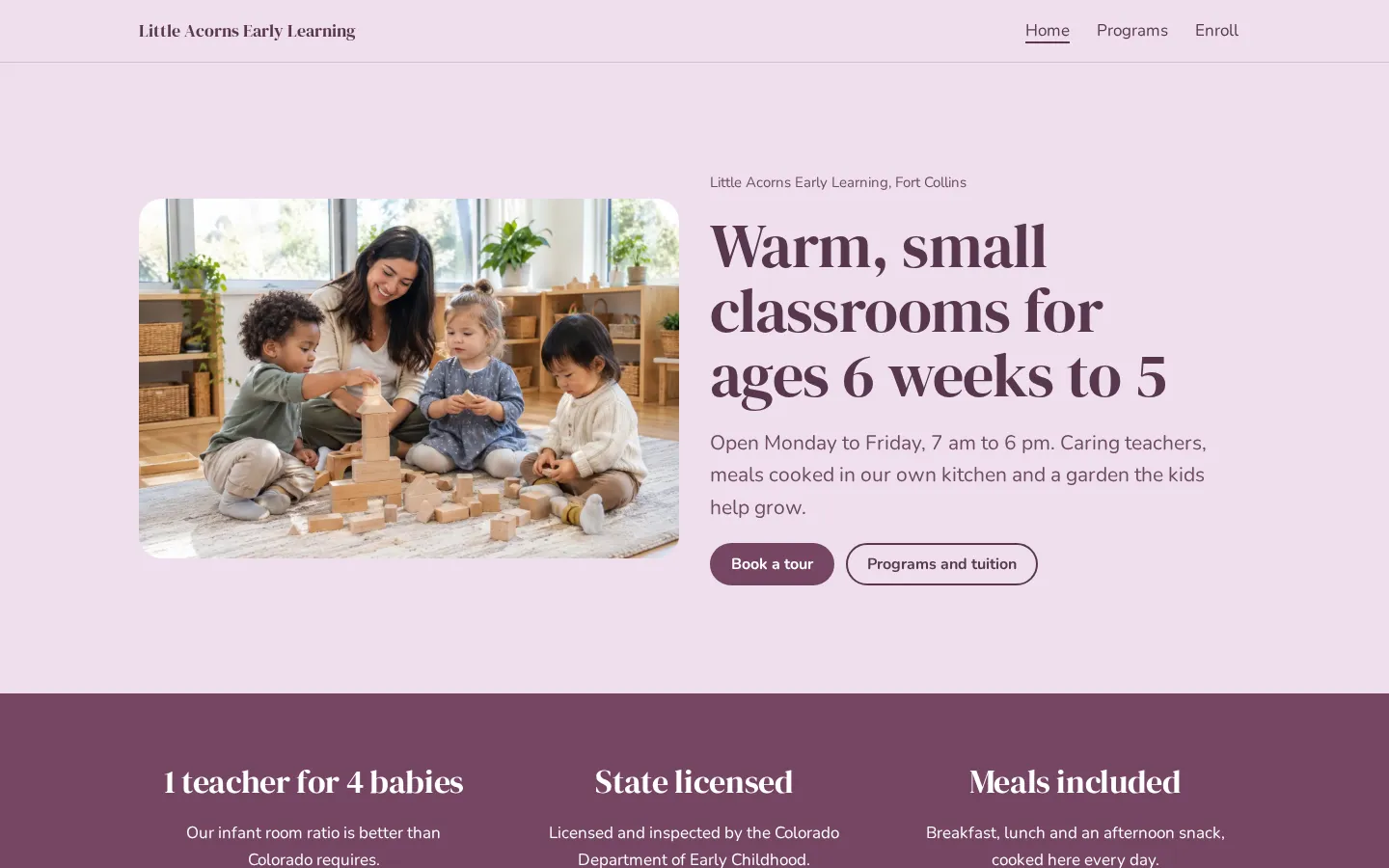
- Home page A photo of kids building with blocks, the ages you take, your hours, and Book a tour and Programs and tuition buttons.
- Three quick facts A band with what parents ask about first: your infant ratio, your state license and meals included.
- Rooms and tuition Infants, toddlers and preschool, each with its ages, one line on the room and a weekly price.
- A day at the center The daily schedule from 7:00 am drop-off to 6:00 pm close, next to a garden photo.
- Parent reviews and tours Two short quotes from parents, then a band with tour days, a Book a tour button and a call button.
- Programs page Each room with its ratio, group size, focus and weekly tuition, plus what tuition includes, fees and discounts, and your closures.
- Enroll page Four steps from tour to first day, 4 answers to questions parents ask, and your address with directions, call and email buttons.
Make your daycare website in 5 steps
- Open the templateIt opens in the Heya builder with all 3 pages, the photos and the text in place. You do not need an account to start.
- Set your rooms and pricesClick any text to change the center name, the ages, the ratios and the weekly tuition. Check the ratios against your state license.
- Add your photosReplace the two photos with your own classrooms or yard. Get written permission from parents before you show any child's face.
- Link tour bookingPaste your Calendly or other booking page link into the Book a tour buttons, and link a Google Form for the waitlist.
- Publish and shareSign in with Google, pick an address like little-acorns.heya.bio and publish. Add the link to your Google Business Profile and your flyers.
Daycare website checklist
- The ages you take and your hours
- Your license and your ratios
- Weekly tuition, or at least a starting price
- What tuition includes, like meals and diapers
- A daily schedule
- How to book a tour
- How the waitlist works
- Sick-day and allergy policies
- Your address, with a map link
- A phone number parents can call
What it costs
The free plan covers everything this template needs. Pro Lite removes the badge and raises the page limit.
| Plan | Free | Pro Lite |
|---|---|---|
| Price | $0, no credit card | $9 a year |
| Sites | 3 | 3 |
| Pages per site | Up to 5 | Up to 20 |
| Address | name.heya.bio with HTTPS | name.heya.bio with HTTPS |
| Made with Heya badge | Small badge | No badge |
| HTML download | Yes | Yes |
| Built-in forms | Not yet, link to an outside form | Not yet, link to an outside form |
Swipe the table sideways to see both plans.
What Heya doesn't do yet
Heya has no booking or forms yet, so tours and waitlist sign-ups happen on another site. Link the Book a tour buttons to a Calendly page or add a Calendly embed, and use a Google Form for the waitlist. Forms are planned for Pro Standard ($19 a year), which isn't live.
There is no password protection yet, so keep daily photos and anything private in your parent app. Tuition payments are not available either, so link to the billing tool you already use.
Questions
Is this daycare website template free?
Yes. The template and publishing are free: up to 3 sites with up to 5 pages each on a name.heya.bio address with HTTPS, no credit card and no time limit. Free sites show a small "Made with Heya" badge, which Pro Lite removes for $9 a year.
How do parents book a tour?
The Book a tour button links to any booking page you use, like Calendly. You can also add a Calendly embed to a page so parents pick a time without leaving your site.
Can parents join the waitlist on the site?
Not with a built-in form yet. Link a Google Form for the waitlist, and every request lands in one spreadsheet. Built-in forms are planned but not live.
Do I have to show tuition?
No. The template shows a weekly price for each room on the home page and the Programs page. Delete those lines if you'd rather share rates on a tour.
Can I use photos of the kids?
Only with written permission from their parents. Photos of rooms, toys and hands work well too. You can swap any photo in the builder.
Will it work on phones?
Yes. Every section stacks into one column on a phone, so parents can read the schedule and call you with one tap.
More templates like this
Start your daycare website
Open the template, add your details and publish free on name.heya.bio. No code and no credit card.